
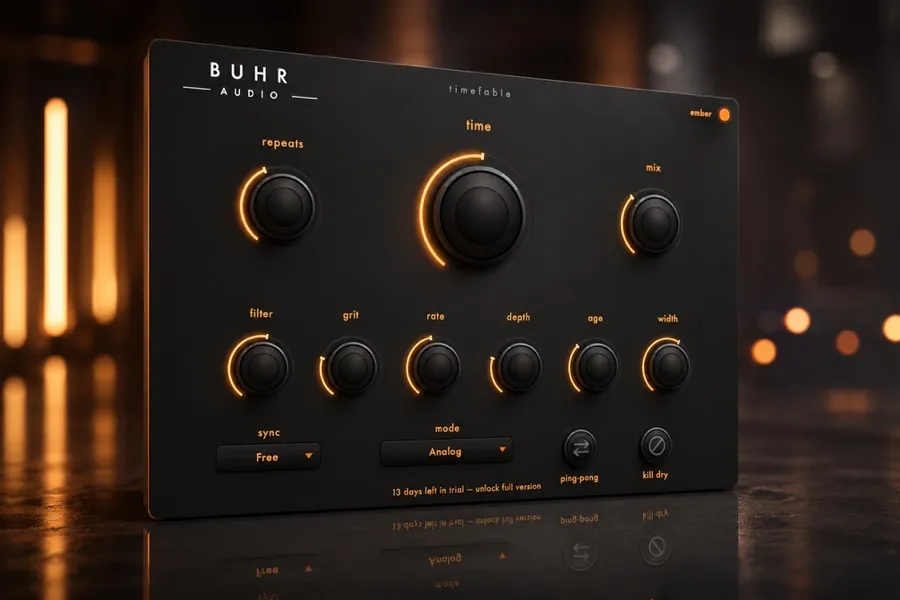
Use delay to add depth and rhythm without clutter: sync the time to your tempo, keep feedback modest, high- and low-cut the repeats so they sit behind the dry signal, and duck the delay under the vocal. For a warm, characterful tail, an analog-modelled delay like TimeFable beats a clean digital one.
Delay vs reverb: when to use which
Both create space, but they do it differently. Reverb is a wash of hundreds of tiny reflections — great for ambience, but it can quickly cloud a mix. Delay is a small number of distinct repeats, so you can add depth and rhythm while keeping things clear. A good habit: reach for delay first, and only add reverb if you still need more glue.
Sync the delay to your tempo
The single biggest upgrade to most delays is setting the time to a musical note value instead of a random millisecond figure. Tempo-synced repeats lock to the groove instead of fighting it. These are the note values you will use most:
- 1/4 note
- Big, obvious echoes — dub, ballads, anything spacious.
- 1/8 note
- Tight, driving repeats that reinforce the rhythm.
- Dotted 1/8
- The classic 'searching' delay heard on countless guitar and synth hooks.
- 1/8 triplet
- Rolling, bouncy repeats that add motion to leads and vocals.
Set feedback with intention
Feedback controls how many times the echo repeats. Low feedback (one or two repeats) thickens a sound; high feedback (many repeats) creates a tail that can build into a wash. Start lower than you think — it is easy to drown a track in repeats. If you want a long, blooming tail without mud, lean on the EQ trick below.
EQ and duck the repeats
This is what separates an amateur delay from a professional one. The repeats should support the dry signal, not compete with it:
- High-cut the repeats so they sit behind the source and feel further away — analog delays do this naturally as the tail darkens.
- Low-cut the repeats to stop them building up boom and mud in the low-mids.
- Duck the delay under the vocal (sidechain the delay to the dry signal) so echoes only bloom in the gaps between phrases.
- Pan the repeats wide or use ping-pong to add width without crowding the centre.
Try TimeFable
Warm tape and BBD-style analog delay with hands-on modulation and character. $4 one-time. AU and VST3 for macOS and Windows.
Get TimeFableReach for analog character
A clean digital delay repeats your signal perfectly — which can sound sterile. Analog-style delays (tape and BBD) colour each repeat: the tail gets darker, a little saturated, and gently pitch-modulated, so it melts into the track instead of cluttering it. That is exactly why a warm, characterful delay tends to sit better in a busy mix. If you are unsure which flavour you want, see tape vs BBD vs digital delay and our pick for the best analog delay plugin.
Four quick delay recipes
- Slapback — one short repeat (60–140 ms), almost no feedback. Vintage thickness for vocals and guitars. Full walkthrough in slapback delay explained.
- Dub echo — high feedback, filtered repeats you ride by hand. See how to get a dub delay.
- Rhythmic 1/8 — synced, panned repeats to push a lead or synth forward.
- Ambient wash — dotted 1/4 with long feedback, heavily high-cut, ducked under the part.
Hear it in your own track
Get TimeFable for $4 and run your tracks through warm analog delay in minutes.
Get it nowFAQ
How do I sync delay to my tempo?
Should delay come before or after reverb?
Why does my delay make the mix muddy?
Written by Reinhardt Buhr, a Hamburg-based live-looping multi-instrumentalist and the developer behind Buhr Audio. TimeFable is his warm, analog-modelled delay — try it free here.