
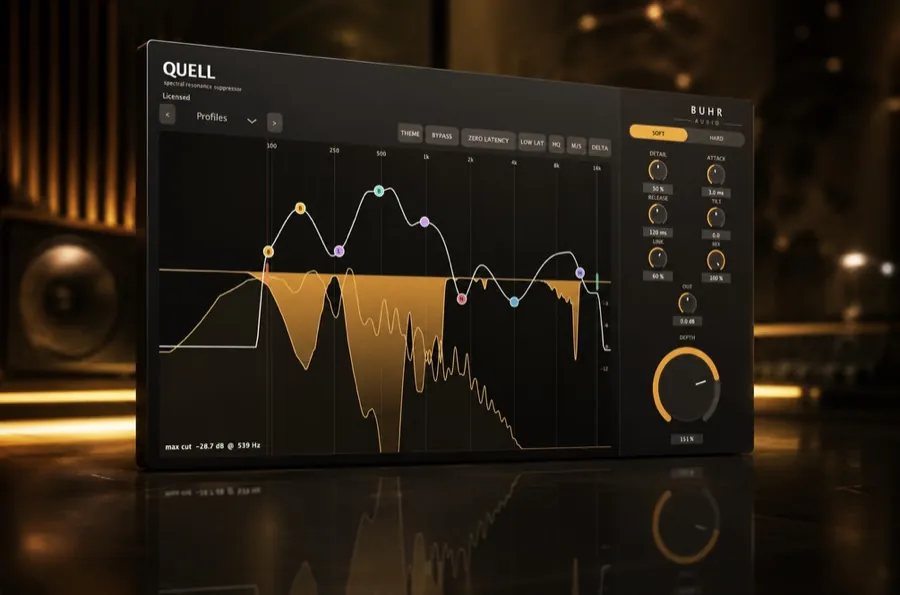
To remove harsh resonances from a vocal: insert a dynamic resonance suppressor like Quell on the vocal, play the harshest line, raise the sensitivity until the ringing is tamed, then back off until the vocal sounds natural. Quell is $2 (AU/VST3, macOS & Windows).
Why vocals get harsh
Every voice, microphone and room combination produces resonances — narrow frequencies that ring louder than everything around them. On vocals, harshness usually builds up between roughly 2 kHz and 8 kHz: presence, edge and sibilance. Push the vocal louder, add compression and saturation, and those resonances get exaggerated until the take sounds brittle or piercing.
The tricky part is that they move. A harsh resonance on one note may sit at 3 kHz, on the next at 5 kHz. A fixed EQ cut can't follow that, which is why this is a job for a dynamic resonance suppressor.
Step-by-step: taming a harsh vocal
1. Insert the resonance suppressor
Add Quell as an insert on the vocal track. Place it after any corrective EQ (high-pass, broad tonal shaping) and ideally before heavy compression, so you're taming the raw resonances before the compressor brings them forward.
2. Find the harsh frequencies
Solo the vocal and play its loudest, harshest phrase. Watch Quell's spectral display — the resonant peaks light up where the harshness lives. You don't have to name the exact frequency; you just need to see that there's energy to tame.
3. Set the sensitivity
Raise the sensitivity until the ringing and edge come under control. Then back it off slightly — the goal is a vocal that's smooth but still present and alive, not dull. Because Quell is dynamic, it only acts when the resonance is actually harsh, so you can be fairly assertive without hollowing out the tone.
4. Check it in the mix
Un-solo and listen with the full mix playing. Toggle Quell in and out (A/B). If the vocal still bites, add a touch more depth; if it's lost some sparkle, ease back. Trust the full-mix context over the soloed sound.
Do this with a free plugin
Quell is the full spectral resonance suppressor, $2 — pay what you want. AU & VST3 for macOS & Windows.
Get Quell · $2Tips for cleaner results
- Don't overdo it. If the vocal sounds lifeless, you've gone too far — resonance control should be felt, not heard.
- Stack gently. A little resonance suppression before compression, and a touch more after, often beats one heavy pass.
- Use it everywhere. The same approach works on backing vocals, harmonies and vocal busses. Quell is light on CPU, so run it on all of them.
- Pair with de-essing if needed. Quell handles most sibilance, but on extreme cases you can still add a dedicated de-esser after it.
Beyond vocals
The exact same workflow tames boxy guitars, ringing snares and piercing cymbals. For the bigger picture on choosing a tool, read the best free resonance suppressor plugin in 2026.
Smooth, present vocals — for free
Grab Quell and fix harsh vocals in your next session.
Get Quell · $2FAQ
What frequencies make vocals sound harsh?
How do I remove harshness from vocals cheaply?
Is a resonance suppressor the same as a de-esser?
Written by Reinhardt Buhr of Buhr Audio. Quell is his $2 spectral resonance suppressor — download it free here.