
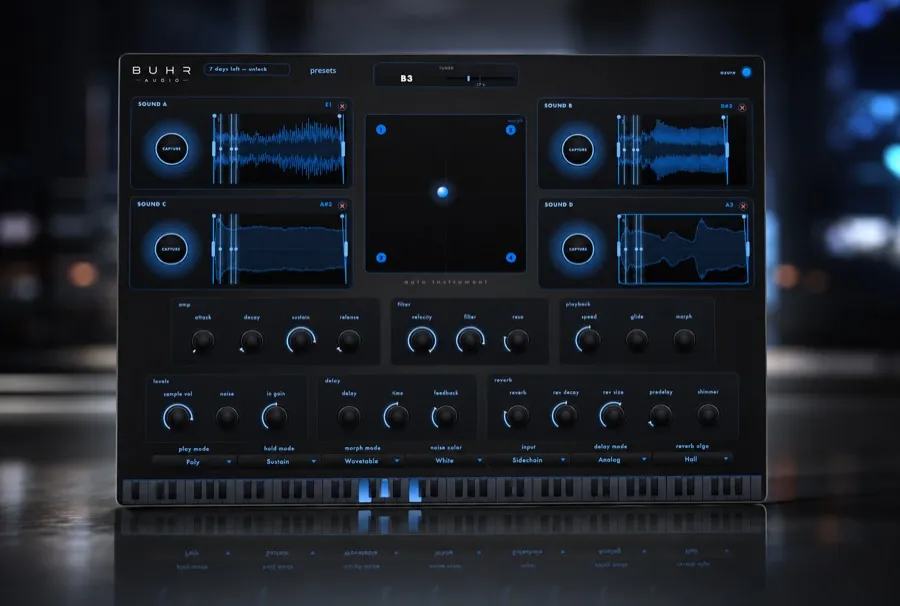
Two paths. The manual way: record a clean sustained note, trim and loop it, tune it to a reference pitch, then map it across a keyboard in a sampler. The fast way: Auto Instrument by Buhr Audio captures any melodic sound, auto-tunes it and maps it across all 88 keys automatically — then can morph it into a wavetable, spectral or granular synth. AU, VST3 & Standalone for macOS, $4 one-time.
Any pitched sound is an instrument waiting to happen
Samplers have been built on one idea since the 1980s: if you can record a sound, you can play it. A single note — sung, plucked, struck or synthesized — contains everything a keyboard instrument needs. Shift its pitch and you get every other note; trigger it from MIDI and it plays like a piano. That's how entire genres were built from breakbeats, orchestra hits and answering-machine messages.
The catch has never been the idea. It's the workflow. Turning a raw recording into something that actually plays well takes a series of careful, fiddly steps. Let's walk through them first — partly because the craft is worth knowing, and partly because it explains what modern tools are automating for you.
The classic workflow: building an instrument by hand
- 1. Record a clean note
- Capture one sustained note in a quiet room — steady pitch, no background noise, and let it decay naturally. The cleaner the source, the better everything downstream behaves.
- 2. Trim and loop it
- Cut the silence before the attack and, if you want notes to sustain longer than the recording, set loop points in the steady part of the sound — ideally at zero crossings so the loop doesn't click.
- 3. Tune it to a reference
- A recorded note is almost never exactly on pitch. Detect its actual frequency, then retune it to the nearest semitone so that pressing C actually plays a C.
- 4. Map it across the keyboard
- In your sampler, set the root key and stretch the sample across a key range. For wider playable ranges, record several notes and build multiple zones, each covering a few keys around its root.
- 5. Fix the stretching artifacts
- Pitch a single sample too far up and it turns thin and chipmunk-like; too far down and it becomes slow and smeared. You either embrace that character or record more zones to reduce the stretch.
None of these steps is hard on its own. Together, they're the reason most producers have a folder of half-finished sampler patches — the distance between "cool sound" and "playable instrument" is about twenty minutes of housekeeping, every single time.
Why melodic, pitched sources work best
Every step above leans on one property of the source: a clear fundamental pitch. Tuning needs a frequency to detect. Key-mapping needs a root note to transpose from. A sung vowel, a guitar string, a synth tone or a ringing wine glass all have that stable pitch, which is why they map beautifully across a keyboard.
Unpitched sources — claps, hiss, most percussion — don't have a note to tune, so they can't be spread across a keyboard as a melodic instrument in the same way. They make great one-shots and drum kits, but if your goal is chords and melodies, start with something you could hum along to. A clean, sustained note beats an interesting-but-chaotic one every time.
Try Auto Instrument
Capture any melodic sound — it's auto-tuned and playable across 88 keys in seconds. $4 one-time, no watermark. AU, VST3 & Standalone for macOS.
Get it nowThe fast way: capture, auto-tune, play
Auto Instrument exists to collapse that whole checklist into one motion. It's a capture & morph sampler instrument: you capture any melodic sound — your voice, a guitar, a synth, anything pitched — and it auto-tunes the capture and maps it across all 88 keys automatically. No pitch detection by hand, no root-key math, no zone editing. The moment the capture lands, it's a playable instrument.
Then it goes somewhere a classic sampler can't. Auto Instrument can morph the captured sound into a wavetable, spectral or granular synth built from that capture. Instead of just replaying your recording at different pitches, you're playing a synthesizer whose raw material is the sound you fed it — which is a very different creative place to be.
It runs as AU, VST3 and Standalone on macOS 11+ (Apple Silicon & Intel), inside any AU/VST3 host — Ableton Live, Logic Pro, FL Studio, Studio One, Cubase, Bitwig, Reaper. It costs $4 one-time with lifetime updates, with no watermark and no locked features.
Three recipes to try first
- Voice into a pad. Sing one clean "ooh" or "ahh," capture it, and play slow chords with your own voice. Morph it into a spectral synth for an evolving, choir-like pad that no preset library contains.
- Wine glass into keys. Ring a wine glass or ceramic bowl near a mic and capture the tone. Auto-tuned and mapped across the keyboard, it becomes a delicate bell-like keys instrument — great for intros and top lines.
- Guitar harmonic into a synth. Capture a single harmonic or clean plucked note, then morph it into a wavetable or granular synth. The guitar's character stays in the sound, but it plays and moves like a synthesizer.
The pattern is always the same: find a pitched sound with some personality, capture it clean, and let the instrument-building happen automatically. The twenty minutes of housekeeping become the fun part — hunting for sounds worth capturing.
FAQ
How do I turn any sound into a playable instrument?
Can I make an instrument from my voice?
What sounds work best?
Does Auto Instrument work on Windows?
Your next instrument is lying around the house
Get Auto Instrument for $4 — no watermark — and turn the first pitched sound you find into a playable instrument, with lifetime updates.
Get it nowWritten by Reinhardt Buhr, a Hamburg-based live-looping multi-instrumentalist and the developer behind Buhr Audio. Auto Instrument is his capture & morph sampler — learn more here or try it free on Gumroad.