
Turn any sound into a playable instrument.
Capture your voice, a guitar, a synth — anything pitched. Auto Instrument auto-tunes the capture and maps it across all 88 keys, instantly playable. Then morph it into a wavetable, spectral or granular synth built from your sound.
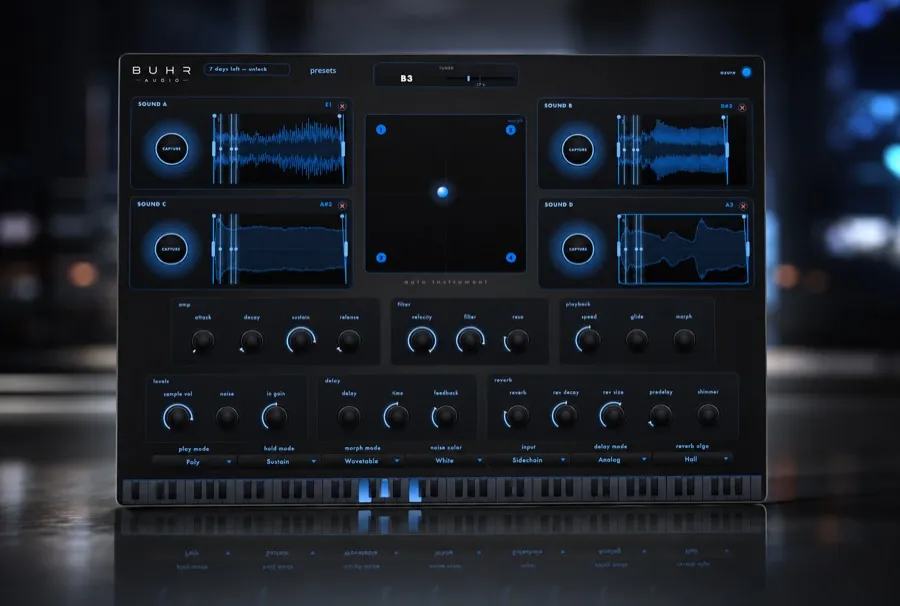
One instrument from any melodic sound
From capture to instrument in seconds
Capture any melodic sound
Sing a note, pluck a string, play a synth — anything pitched. Auto Instrument records your source straight into the plugin.
It auto-tunes & maps it across 88 keys
The capture is automatically tuned and spread across the full keyboard, so it's instantly playable — chords, melodies, basslines.
Morph it into a synth
Push the capture further: morph it into a wavetable, spectral or granular synth built from your sound.
A sampler that does the sampling for you
Building an instrument from a sound normally means recording, trimming, tuning and key-mapping by hand. Auto Instrument collapses all of it into one capture.
Capture any melodic sound
Your voice, a guitar, a synth, a ringing glass — if it has a pitch, Auto Instrument can capture it and turn it into an instrument.
Auto-tuned on capture
No pitch detection, no manual retuning. The capture is automatically tuned so it plays in key from the very first note.
Playable across all 88 keys
One capture is mapped across the full 88-key range — play chords, basslines and melodies with the sound you just made.
Morph into a synth
Take the capture beyond sampling: morph it into a wavetable, spectral or granular synth built entirely from your sound.
AU, VST3 & Standalone
Load it in any AU/VST3 host on macOS — Ableton Live, Logic Pro, FL Studio and more — or run the Standalone app on its own.
$4, yours for good
The full plugin with no watermark — $4 one-time with lifetime updates. No subscription, ever.
Three ways to use Auto Instrument
Anything with a pitch is raw material. Capture it once, play it everywhere.
Turn your voice into a pad
Sing one sustained note, capture it, and play full chords with your own voice across the keyboard. Morph it into a spectral synth for an evolving vocal pad, then polish it with Aurora, our free shimmer reverb.
Sample household objects into keys
Tap a wine glass, ring a ceramic bowl, hum into a bottle. Auto Instrument tunes the ring and maps it across 88 keys — a one-of-a-kind keyboard instrument nobody else owns.
Resample your own synths
Capture a single note from a hardware synth or a soft synth like Felted Synth, then morph it into a wavetable or granular synth to pull brand-new textures out of sounds you already love.
Made for the Mac in your studio
AU, VST3 & Standalone for macOS 11 and later — Apple Silicon and Intel.
- Price
- $4 USD one-time · no watermark · lifetime updates.
- Formats
- AU (Audio Unit), VST3 and Standalone — all included.
- Platform
- macOS 11 Big Sur and later · Apple Silicon & Intel. Currently macOS-only.
- Hosts
- Ableton Live, Logic Pro, FL Studio, Studio One, Cubase, Bitwig, Reaper and any AU/VST3 host on macOS.
- Delivery
- Instant download via Gumroad.
- Maker
- Built by Reinhardt Buhr / Buhr Audio — clean, musical, CPU-friendly plugins.
Get the most out of Auto Instrument
Guides on sampling, capturing and turning everyday sounds into playable instruments.
How to turn any sound into a playable instrument
The classic sampler workflow — record, tune, loop, map — and how Auto Instrument collapses it into one capture.
Read → GuideFrom loop to instrument: Sample Slice & Auto Instrument
How captured audio becomes playable material inside the Buhr Audio ecosystem.
Read → BlogBrowse all guides
Mixing, sampling, delays, reverbs, looping and more — free production guides from Buhr Audio.
Read →Good to know
What sounds work best with Auto Instrument?
Which formats and platforms are supported?
Which DAWs does it work in?
Does it run on Windows?
How much does Auto Instrument cost?
Turn your next sound into an instrument
Capture a sound, play it across 88 keys, morph it into a synth — no watermark. Keep it forever for $4 with lifetime updates.