
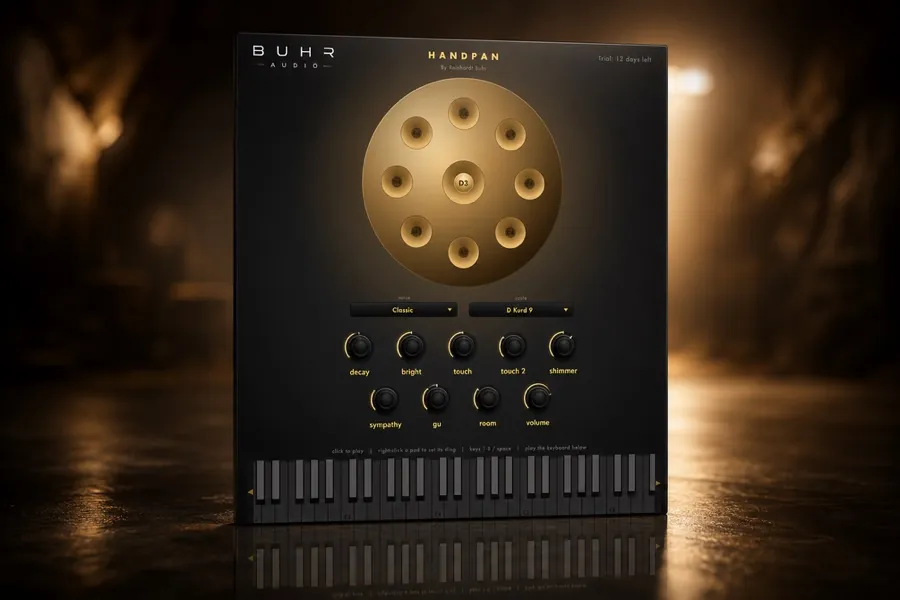
Load a handpan plugin on a MIDI track, choose a scale like D Kurd, and play it with a MIDI keyboard or pads. Because the notes are mapped to the scale, anything you play stays in key — and varying how hard you strike changes the tone, just like a real handpan. The Buhr Audio Physical Modelling Handpan works in any AU/VST3 DAW on macOS and Windows.
What you'll need
- A DAW — Ableton Live, Logic Pro, FL Studio, Studio One, Cubase, Bitwig or Reaper all work.
- A handpan plugin in AU or VST3 format (the Physical Modelling Handpan is $9).
- Optional but recommended: a velocity-sensitive MIDI keyboard or pad controller.
Step by step
- 1 · Load it
- Create an instrument/MIDI track and insert the handpan plugin (AU or VST3). Just run the installer and rescan plugins in your DAW.
- 2 · Pick a scale
- Choose a handpan scale — D Kurd is the classic. The plugin lays the notes across your keyboard so you can't easily play a wrong note.
- 3 · Play it in
- Perform the part live, mixing soft and firm strikes. A modelled handpan changes tone with velocity, so dynamics are where the magic is.
- 4 · Shape the tone
- Dial decay, brightness, sympathetic resonance and room until it fits the track — darker and longer for ambient, tighter for rhythmic parts.
- 5 · Mix it
- Pan it, add a touch of reverb or delay for space, and use gentle EQ so it sits under vocals or pads without clashing.
Get the Physical Modelling Handpan
A fully playable, fully modelled handpan — no samples. $9 one-time. AU & VST3 for macOS & Windows.
Get it nowChoosing the right scale
The scale sets the mood before you play a note. A few starting points:
- D Kurd — the most popular handpan scale; meditative, slightly melancholic and very forgiving. Start here.
- Celtic / minor scales — emotional and cinematic, great under film and storytelling.
- Major / brighter scales — warmer and more uplifting, nice for lo-fi and songwriting.
Because a handpan scale is a curated set of notes, improvising is almost foolproof — wander around and it stays musical. Want the background on why a modelled handpan responds so naturally? See what is a physical modelling handpan.
Playing it expressively
A handpan part lives or dies on feel. Three quick habits make a programmed part sound human:
- Use dynamics. Let some notes whisper and others ring out. On a modelled handpan this changes the timbre, not just the level.
- Leave space. The instrument's long bloom does a lot of the work — don't crowd every beat.
- Vary timing slightly. Tiny human imperfections in timing and velocity keep it from sounding robotic.
Mixing a handpan
Handpans are rich and resonant, so a light touch goes far. Carve a little low-mid mud if it's clashing with other instruments, add reverb or a slow delay for that floating, hypnotic space, and keep automation subtle. If a bright scale or hard playing ever turns harsh, a resonance suppressor like Quell tames the ring without dulling the bloom.
Write your first handpan part today
Get the Physical Modelling Handpan for $9 and have a part recorded in minutes.
Try it freeFAQ
How do I play a handpan VST?
What is the easiest handpan scale to start with?
Do I need a special controller to play a handpan plugin?
Written by Reinhardt Buhr, a Hamburg-based live-looping multi-instrumentalist and the developer behind Buhr Audio. The Physical Modelling Handpan is his fully-modelled handpan instrument — try it free here.