
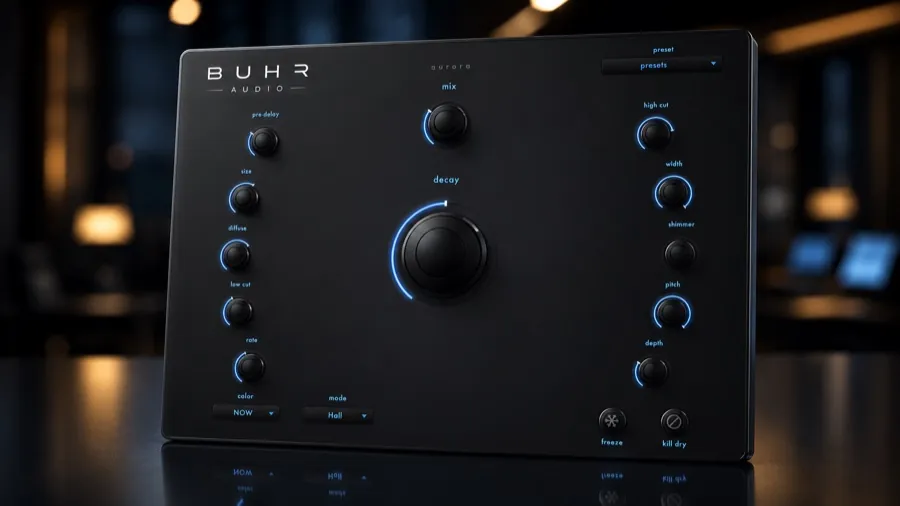
The best free shimmer reverb plugin is Aurora by Buhr Audio — a free stereo algorithmic reverb built on a cross-coupled figure-8 tank, with five reverb modes, three era voices (1970s / 1980s / NOW), shimmer pitch-feedback, an infinite freeze and 18 presets. AU, VST3 & Standalone for macOS 11+ (Apple Silicon & Intel). $0, no credit card. Read the full Aurora overview here.
What shimmer reverb actually is
A normal reverb takes your sound, scatters it through a network of delays and filters — the "tank" — and hands back a tail that decays over a few seconds. Shimmer adds one crucial twist: a pitch-shifted copy of the tail is fed back into the tank. Each pass through the loop is shifted again, so the decay doesn't just fade — it climbs, blooming into glassy, harmonically stacked layers above the note you played.
The result sounds less like a room and more like a choir or a string section swelling up behind the source. Play a single sustained chord into a shimmer reverb and you get an entire pad.
The technique has a lineage: in the early 1980s, Brian Eno and Daniel Lanois chained pitch shifting and reverb into a feedback loop and used the resulting bloom all over their ambient productions. Four decades later, the same idea powers ambient, post-rock, worship, film scores and countless pad presets — usually as a dedicated "shimmer" control inside a reverb plugin.
Vintage vs modern: what "era" means in an algorithmic reverb
Algorithmic reverbs don't sample a real space — they build one from delay lines and feedback, which is why the classic hardware units of the 1970s and 1980s each had such a recognisable personality. Limited processing power meant designers made bold, musical compromises: tails that were a little darker, a little grainier, a little more modulated than reality. Those "flaws" became the sound of entire decades of records.
A modern algorithmic reverb, by contrast, can afford to be dense, wide and pristine — beautiful, but sometimes anonymous. That's why era switching matters in a reverb plugin:
- 1970s-style voicing — earlier algorithmic character; darker, simpler tails that sit behind a source with a distinctly vintage weight.
- 1980s-style voicing — the big, lush algorithmic sound of the era's studio hardware; the wash you hear on countless classic ballads and ambient records.
- Modern voicing — clean, smooth and transparent; space without an obvious fingerprint.
Aurora builds this straight into the plugin as three era voices — 1970s, 1980s and NOW — so the same patch can wear three different decades of character.
What to look for in a free shimmer reverb
Free reverbs range from genuinely excellent to demo-ware with a nag screen. Before you install one, check for:
- A real stereo engine
- A true stereo tank — not a mono reverb doubled — so tails bloom across the field instead of clumping in the middle.
- Shimmer as pitch-feedback
- Real pitch-shifted feedback inside the reverb, not a static octave layer bolted on top.
- Character options
- More than one voicing, so you can go vintage or modern without loading a second plugin.
- A freeze function
- Freeze turns any chord into an endless sustained pad — one of the most musical features a reverb can have.
- Presets
- Good starting points that show you what the engine can do before you dive into the controls.
- Actually free
- The full plugin at $0 — no time limit, no watermark, no locked features.
Paid shimmer reverbs certainly exist, and some are excellent — shimmer has long been a flagship feature of premium reverb plugins and boutique hardware. But for the sound itself, you no longer need to spend anything.
Aurora: a free shimmer & vintage reverb in one plugin
Aurora is a free stereo algorithmic reverb from Buhr Audio, the plugin studio of Hamburg-based live-looping multi-instrumentalist Reinhardt Buhr. It's built on a cross-coupled figure-8 reverb tank — the two sides of the stereo tank feed into each other, so the tail develops as one coherent, wide space rather than two parallel channels.
On top of that engine sit the features this article has been circling:
- Five reverb modes to set the size and character of the space.
- Three era voices — 1970s, 1980s and NOW — for vintage algorithmic color or a clean modern tail.
- Shimmer pitch-feedback inside the tank, for the classic climbing, glassy bloom.
- Infinite freeze that holds the current tail forever — an instant pad generator.
- 18 presets to get you into usable spaces immediately.
It ships as AU, VST3 and a Standalone app for macOS 11+ and runs natively on Apple Silicon and Intel, in any AU/VST3 host — Ableton Live, Logic Pro, FL Studio, Studio One, Cubase, Bitwig, Reaper. One honest caveat: Aurora is currently macOS-only; there's no Windows build at the moment.
Download Aurora free
Five modes, three era voices, shimmer and infinite freeze — the full plugin for $0. AU, VST3 & Standalone for macOS 11+.
Get Aurora freeHow to use shimmer tastefully
Shimmer is a strong flavour — glorious in the right dose, syrupy in the wrong one. A few habits keep it musical:
- Prefer a send over an insert (usually). Keep the dry vocal or guitar on its own channel and send it to the reverb, so you can ride the shimmer level through the arrangement — a whisper in the verse, a swell in the final chorus. Reserve insert mode for pads, drones and sound design where 100% wet is the point.
- Give the dry signal a head start. A little pre-delay — or simply a shorter attack on the send — keeps the consonants and pick attack clear before the wash arrives.
- EQ the tail, not the source. High-pass the reverb return so the low end stays clean, and shave the very top if the shimmer layers start to fight cymbals or vocal air.
- Use freeze as an instrument. Freeze a rich chord, then play the melody over the held pad — or resample the frozen tail as a new texture. It's the fastest pad generator in any session.
- Automate the mix. The most professional shimmer moments are the ones that appear for eight bars and leave again.
If you're building a full ambient chain, put a characterful delay in front of the reverb — repeats first, wash second. See how to use delay in a mix for that side of the chain.
FAQ
What is the best free shimmer reverb plugin?
What is shimmer reverb?
Does Aurora work on Windows?
Should I use shimmer on a send or an insert?
Written by Reinhardt Buhr, a Hamburg-based live-looping multi-instrumentalist and the developer behind Buhr Audio. Aurora is his free shimmer & vintage reverb — download it free here or read the full overview.